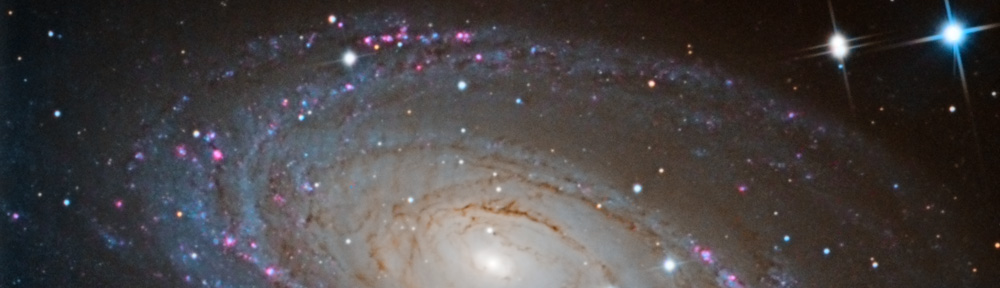
It has finally been achieved. After almost two years, on April 11, 2008, I took a CCD image from Lake Riverside. This took quite a while because I have a full observatory set-up in Los Angeles. So going to a temporary set-up again was a big leap, even to get to darker skies. After all, I do admit to being lazy.
I got up to LRE on Friday afternoon. There was a good wind blowing from the east, but the weather was otherwise pleasant with the temperature in the low 70s. I took care of the yard chores and as soon as the Sun got low I began taking out the equipment. I wanted to wait for the Sun to be fully down before I took out the OTA (optical tube assembly) since I wanted it to be as cool as possible. I had selected the driveway in front of the garage as my location because it was shielded from the east wind.
There is a fair amount of equipment involved:
- Tripod, with spanner
- Mount, with computer assembly, mount proper, and counterweights
- Telescope (or OTA) with dew shield
- Focuser (TCF-S), controller box and power supply
- Dew heater and controller
- 12 volt power supply for mount and dew heater
- Camera (ST-10 w/CFW-8 and AO-7) and power supply
- Table
- Computer, with power supply and wireless rumblepad to control the mount
- USB hub with power supply
- USB to serial adapter (Keyspan)
Once that is all set-up, then I have to connect the mount to the PC. Then software configuration: The Sky to NexRemote, Maxim DL to The Sky, the camera, and the focuser, and Focus Max to the focuser and the Sky. The mount needs to be aligned, polar aligned, and aligned again. This took over an hour.
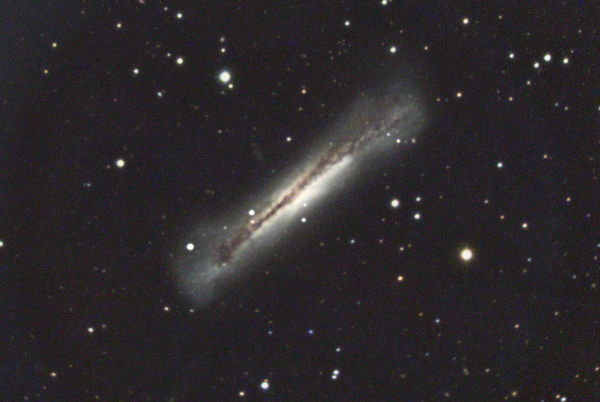
I had settled on NGC 3628 because it is an interesting object in the southeast sky with an excellent magnitude 7.1 guide star. It took about 45 minutes to get the object framed with the guide star on the guide chip, the scope focused, and the shot set-up. By that time is was 10:25pm and NGC 3628 was going to transit (cross the meridian) at 10:45. I decided to take a couple of 5 minute luminance shots anyway.
I went in the house for a few minutes and when I came back (on the phone with my wife) the wind had come up. Only now it was coming from the northeast, not the east and it was buffeting the mount. Two ruined shots, one I ultimately used. And some despair that the wind would ruin the entire night.
After the meridian flip, I tried to get the “acquire star” functionality in Focus Max to work but it wouldn’t. It did not report an error, it just said that it failed. I got it to plate solve and synch the scope, but not acquire a star. This is really a great focus feature when it works. It will find a near-by star, center the star on the CCD, focus, and return to the object. Excellent automation. This work on Focus Max pushed the time to 11:30, but the wind had subsided.
I set up an imaging run of 12 five minute luminance shots and 4 five minute red, green, and blue images. I then went inside out of the cold, as it had fallen to the low 50s by this point. The wind was mostly calm. I checked the process several times, and everything seemed OK. The bright guide star allowed me to use 0.07 second guide shots, running the AO-7 at about 12 Hz. Then, at about 12:15, the back door banged from a gust of wind. When I went outside, a northeast wind was really coming up. The current image was worthless, the last two prior were lost as well. I decided to end the imaging session.
First, I had to shoot flats. I put a pillow case over the front of the OTA and got my flats with light reflected off of the garage. The wind kept rising, so I began to get a little frantic getting everything taken down. Scope shot down and disconnected, camera disconnected and into the house, cables off, OTA off and into the house, PC inside, counterweights off and into the shop, miscellaneous stuff into the shop, finally, the tripod, mount, and table into the garage. Whew.
By this time it was blowing at least 25 to 35 miles per hour. The rest of the night was very noise as the wind kept up, with gusts over 45 miles an hour. It stayed windy until I left at noon on Saturday.
I ended up with 50 minutes of exposure time. 25 minutes of luminance, 10 minutes of red and green, and 5 minutes (only one shot!) of blue. The RGB shots were binned 2×2. The final result doesn’t have a lot of detail, and it is fairly noisy, but the milestone of the first shot from Lake Riverside has been achieved.
NGC 3628 is a spiral galaxy in the constellation of Leo. It is one of the Leo Triplet group of galaxies. NGC 3628 is about 35 million light years away. You can click on the image for more information.